
How to Update PHP Version to Fix PHP2Shell (CVE-2026-109618)
PHP2Shell flaws are being exploited. Here is how to check and update PHP version on shared hosting, a VPS or WordPress to the fixed 8.5.12, 8.4.27, 8.3.36 or 8.2.35 releases.

Image: TeQBlogs
If your website runs on PHP, you need to update PHP version now. Two critical flaws, nicknamed PHP2Shell (CVE-2026-109618 and CVE-2026-109619), can let an attacker run code on a server without logging in, and CERT-In says they are being exploited at large scale. The fix is simple: move to PHP 8.5.12, 8.4.27, 8.3.36 or 8.2.35 or later. This guide shows how to check and update on shared hosting, a VPS or WordPress.
Quick summary
- Flaws: CVE-2026-109618 (memory corruption) and CVE-2026-109619 (stale request state), both rated CVSS v4.0 9.2 by the PHP team.
- Fixed in: PHP 8.5.12, 8.4.27, 8.3.36 and 8.2.35, released on 21 October 2026.
- Who is at risk: all PHP installations serving web requests, including PHP-FPM, Apache mod_php, php-cgi, FrankenPHP and LiteSpeed. Risk is highest for mod_php.
- India alert: CERT-In note CIVN-2026-0510 rates it Critical.
- Exploited: CISA added both flaws to its Known Exploited Vulnerabilities catalog on 26 October 2026.
- Fix: updating is the only complete solution.
What is PHP2Shell and why it matters
PHP2Shell is the name used for two PHP bugs that can allow unauthenticated remote code execution. The PHP project says that, for mod_php, a demonstrated exploit can trigger the attack before any application code runs, so a well-patched WordPress or Laravel app on top does not protect you.
- CVE-2026-109618, RCE via out-of-memory corruption: out-of-memory handling can interrupt PHP while internal request data is only half set up, and cleanup then treats bad data as valid.
- CVE-2026-109619, RCE via stale global state: request data can survive after its memory is freed, and a later request on the same worker may use it.
CERT-In’s note says “multiple reports confirm large scale exploitation in the wild” and advises users to patch urgently. A successful attack can mean a complete server takeover, data theft or ransomware, much like the recent Synology NAS ransomware attacks on unpatched devices.
Also read: CNAP Caller Name Not Showing? How It Works on Jio, Airtel and Vi
Which PHP versions are affected?
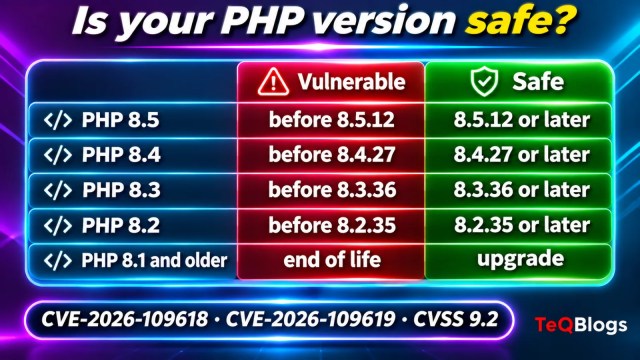
| PHP branch | Vulnerable | Safe version | Support status |
|---|---|---|---|
| PHP 8.5 | Before 8.5.12 | 8.5.12 or later | Supported |
| PHP 8.4 | Before 8.4.27 | 8.4.27 or later | Supported |
| PHP 8.3 | Before 8.3.36 | 8.3.36 or later | Supported |
| PHP 8.2 | Before 8.2.35 | 8.2.35 or later | Security fixes end 31 December 2026 |
| PHP 8.1, 8.0, 7.4 | Yes | No official release; upgrade | End of life (vendor backports only) |
Step 1: Check your current PHP version
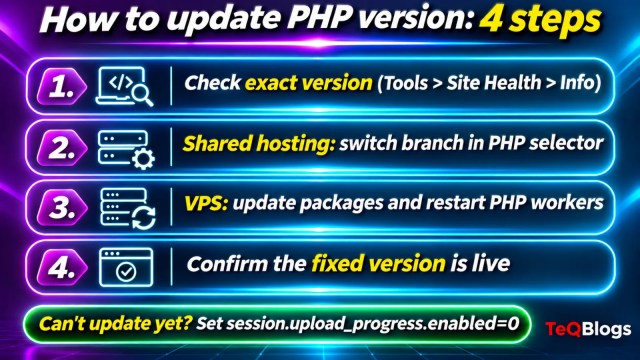
Find the exact version number, not just the branch. “PHP 8.3” alone does not tell you whether you have 8.3.36.
- WordPress: go to Tools > Site Health > Info, open the Server section and read PHP version.
- Hosting panel: in cPanel, look for MultiPHP Manager or Select PHP Version; in Plesk, open your domain’s PHP Settings.
- VPS or dedicated server: run
php -v. The command-line PHP can differ from the one serving your site, so also check the PHP-FPM or Apache module version (for examplephp-fpm8.3 -v, depending on your setup).
Step 2: How to update PHP version on shared hosting
On shared hosting you usually pick the branch, while the hosting company installs the patch releases. Most Indian web hosts using cPanel or Plesk work this way.
- Open your PHP selector (MultiPHP Manager, Select PHP Version or Plesk PHP Settings).
- If you are on PHP 8.1 or older, switch to a supported branch such as 8.3 or 8.4. Test the site on a staging copy first if you can.
- Check the full version number again in Site Health.
- If it still shows an older build (for example 8.3.35), raise a support ticket and ask the host to confirm the PHP2Shell patches (CVE-2026-109618 and CVE-2026-109619) are installed.
Step 3: Update PHP on a VPS or your own server
The PHP team says Linux distributions and long-term support vendors got the patches in advance, so use your system’s package manager first.
- Take a backup or snapshot of the server.
- On Ubuntu or Debian, run
sudo apt update && sudo apt upgrade. On RHEL, AlmaLinux or Rocky Linux, runsudo dnf upgrade 'php*'. - Restart every PHP worker: PHP-FPM, Apache (for mod_php) or LiteSpeed. Old workers keep running the vulnerable code until restarted.
- Confirm with
php -vand a Site Health check that the web-facing PHP shows a fixed version or your vendor’s patched build. - On Windows servers, download the updated builds from php.net. The PHP team also released updated Windows builds on 26 October 2026 with a separate Brotli fix.
If you can’t update right away
The PHP project lists temporary measures that reduce exposure to specific attack paths. It is clear that these do not make a server safe; only the update does.
- Set
session.upload_progress.enabled=0in php.ini, the FPM pool or server config (not withini_set()or.user.ini), then restart every worker. - On PHP 8.5, set
fatal_error_backtraces=0and restart. - Lower
post_max_size: 8M if your site needs no uploads, 32M if it does, and keepupload_max_filesizebelow it. - Use container or cgroup memory limits; the PHP team warns not to use
RLIMIT_ASorRLIMIT_DATAinstead.
The PHP team separately recommended keeping session.upload_progress.enabled=0 until its next regular bugfix release because of another, less likely issue (CVE-2026-115560).
After updating: check for signs of compromise
- Look for new or changed PHP files in upload folders such as
wp-content/uploads. - Check for unknown admin users in WordPress and on the server.
- Review web server logs from mid-October onwards for unusual large POST requests or crashes.
- Change hosting, database and admin passwords if anything looks wrong, and restore from a clean backup.
The same “patch fast, then verify” habit applies to other systems too. Our guide to AI agent security after CERT-In’s advisory covers the business side, and our CERT-In Apple advisory guide shows the same steps for iPhones and Macs. If you don’t have in-house staff to manage servers, a web development and maintenance team can handle PHP upgrades and testing for you.
Frequently asked questions
Which PHP version fixes PHP2Shell?
PHP 8.5.12, 8.4.27, 8.3.36 and 8.2.35, or any later release in those branches. Distribution packages may use their own patched build numbers.
Is my WordPress site affected?
Yes, if it runs on an unpatched PHP version. The flaws are in PHP itself, so WordPress core and plugin updates do not fix them.
How do I update PHP version in cPanel?
Open MultiPHP Manager or Select PHP Version, choose a supported branch and save. Then confirm the full version in WordPress Site Health and ask your host if the patch build is installed.
Is PHP 8.1 still safe to use?
No. PHP 8.1 and older no longer get updates from the PHP project, so you should upgrade to 8.3 or newer unless your vendor provides backported fixes.
Bottom line
PHP2Shell is serious, exploited and easy to fix. Check your exact PHP version today, update to 8.5.12, 8.4.27, 8.3.36 or 8.2.35 or later, restart every worker and confirm the change. If you are still on PHP 8.1 or older, this is the moment to upgrade.
Sources
- PHP News Archive 2026: Security advisory, critical remote code execution vulnerabilities (php.net)
- CERT-In Vulnerability Note CIVN-2026-0510
- CISA Known Exploited Vulnerabilities Catalog
- Site Health Screen (WordPress.org documentation)
About The Author


