
Android November Security Update: 216 Flaws Fixed, 23 Critical
Google’s Android November security update fixes 216 vulnerabilities, 23 of them critical, including a no-click Framework bug. Here’s how to check your patch level and install it.

Image: TeQBlogs
The Android November security update is out, and it is one of the largest of the year. Google’s bulletin, published on 2 November 2026, lists 216 vulnerabilities, 23 of them rated Critical, including a Framework bug that could allow remote code execution with no user interaction. If your phone shows a security patch level of 2026-11-05 or later, you are covered for everything in this bulletin.
Quick summary
- Published: 2 November 2026 (Android Security Bulletin, November 2026).
- Patch levels: 2026-11-01 and 2026-11-05. The 2026-11-05 level fixes everything.
- Total fixes: 216 CVEs, 119 at the first patch level and 97 at the second.
- Critical: 23 issues, in Framework, System, Kernel, MediaTek and Qualcomm components.
- Worst bug: a Framework flaw that could lead to remote code execution without extra privileges or any tap from the user.
- Exploited? The bulletin does not mark any of these issues as being actively exploited.
- What to do: check your patch level and install the update as soon as your phone maker releases it.
What the Android November security update fixes

The November bulletin fixes 216 security flaws across the core Android platform and the chip-level code that phone makers ship. Google splits them into two patch levels so that manufacturers can push the common platform fixes quickly, while chip-specific fixes follow in the second level.
| Patch level | Component | Fixes | Critical |
|---|---|---|---|
| 2026-11-01 | Framework | 65 | 1 |
| 2026-11-01 | System | 53 | 7 |
| 2026-11-01 | Android runtime | 1 | 0 |
| 2026-11-05 | Kernel components | 31 | 6 |
| 2026-11-05 | MediaTek components | 30 | 8 |
| 2026-11-05 | Imagination Technologies | 12 | 0 |
| 2026-11-05 | Qualcomm components | 9 | 0 |
| 2026-11-05 | Qualcomm closed-source components | 8 | 1 |
| 2026-11-05 | Unisoc components | 4 | 0 |
| 2026-11-05 | Arm components | 3 | 0 |
| Total | 216 | 23 | |
Google also says it will publish the matching source code patches to the Android Open Source Project (AOSP) within 48 hours of the bulletin, so custom ROM makers and smaller brands can pick them up.
Also read: Synology NAS Ransomware: Update DSM Now to Stop the Attacks
How serious are the critical bugs?
The most severe issue is in the Android Framework. According to Google, it could lead to remote code execution with no additional execution privileges needed, and user interaction is not needed for exploitation. That is the type of flaw attackers value most, because a victim does not have to tap a link or install anything.
- Framework (Critical RCE): CVE-2026-58868.
- System (Critical RCE): CVE-2026-58876 and CVE-2026-58936, plus several Critical elevation-of-privilege bugs.
- Kernel (Critical): six issues, including Bluetooth bugs CVE-2026-53256 and CVE-2026-89774, and pKVM (virtualisation) issues.
- MediaTek (Critical): eight issues, mainly in the modem, which handles the phone’s cellular connection.
- Qualcomm closed-source (Critical): CVE-2026-25285.
Google notes that its severity ratings assume Android’s built-in protections are switched off or bypassed. In practice, features like Google Play Protect and the platform’s security hardening make attacks harder. Even so, a no-click Framework bug and a batch of modem flaws are good reasons not to postpone this update.
Are any of these flaws being exploited?
No. Unlike some earlier 2026 bulletins, the November bulletin does not flag any vulnerability as under limited, targeted exploitation. That means there is no known attack using these bugs right now, but details of fixed flaws become public once the AOSP patches are released, which can make it easier for attackers to study them. Updating early closes that window.
How to check your Android security patch level
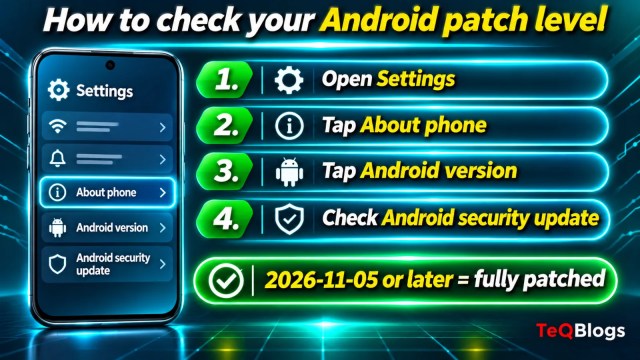
It takes less than a minute to see whether your phone already has the November fixes. Google’s own steps are below; menu names can vary slightly by brand.
- Open the Settings app.
- Tap About phone (or About tablet).
- Tap Android version.
- Look at Android security update. A date of 5 November 2026 (2026-11-05) or later means you have every fix in this bulletin. 1 November 2026 means you have the platform fixes, but not the chip-level ones.
How to install the update
- Connect to Wi-Fi and charge your phone to at least 75%, as Google recommends.
- Open Settings and tap System, then Software updates. On many Samsung phones this is Settings > Software update. If you can’t find it, type “update” in the Settings search bar.
- Tap to download and install, then restart when asked.
- Also search Settings for Google Play system update and install it. In November, Google is fixing issues in Media Codecs, Media Framework, MediaProvider, Profiling, Telephonycore and Wi-Fi through these Google Play system updates.
When will Samsung, OnePlus, Xiaomi and other phones get it?
Google publishes the bulletin, but each phone maker decides when its own update reaches your device. Pixel phones usually get Google’s monthly patch first, while other brands roll it out over the following weeks, often starting with flagship models. At the time of writing, Google’s separate Pixel bulletin page for November 2026 was not yet live.
| Your patch level shows | What it means | What to do |
|---|---|---|
| 2026-11-05 or later | All 216 fixes installed | Nothing; keep auto-updates on |
| 2026-11-01 | Platform fixes only (119) | Watch for the next update from your phone maker |
| October 2026 or older | None of the November fixes | Check for updates now |
| Older than 2025 | Phone may no longer get patches | Consider a supported phone |
If you recently moved to Samsung’s new software, our guide to the One UI 9 update in India explains which Galaxy phones are eligible and how to install it.
Simple steps to stay safe until the patch arrives
- Keep Google Play Protect on (Play Store > profile icon > Play Protect).
- Install apps only from the Play Store or your phone maker’s store.
- Turn off Bluetooth when you don’t need it, since two of the critical kernel bugs are in Bluetooth code.
- Don’t open unexpected files or links, even from known contacts. Last week’s Android SMS of Death bug showed how a single message can cause trouble.
- For iPhone users in the family, see our guide on what Apple’s threat notification means.
Businesses that hand out company phones should push the update through their device management tool and block phones that stay on old patch levels. If you need help setting that up, managed IT support can handle patch tracking for a whole team.
Frequently asked questions
What is the Android November 2026 security patch level?
There are two: 2026-11-01 and 2026-11-05. A phone on 2026-11-05 or later has all 216 fixes from the November bulletin.
Is the November Android update safe to install?
Yes. It is an official security update from Google delivered through your phone maker. Back up your phone, use Wi-Fi and keep the battery above 75% before installing.
Are any November 2026 Android bugs being exploited?
Google’s bulletin does not mark any of the 216 issues as being exploited in the wild. Installing the update early still reduces risk once technical details become public.
Why hasn’t my phone received the update yet?
Each manufacturer tests and releases Google’s patches on its own schedule, so it can take days or weeks. Older models may get it later or not at all.
Bottom line
The Android November security update fixes 216 flaws, including 23 critical ones and a no-click Framework bug. Nothing is known to be exploited yet, so this is the right time to update calmly: check your patch level today and install the update as soon as it appears.
Sources
- Android Security Bulletin, November 2026 (Android Open Source Project)
- Check and update your Android version (Android Help)
About The Author


