
PHP Security Update: 7 Critical Flaws Fixed in 8.5.13, 8.4.28, 8.3.37 and 8.2.36
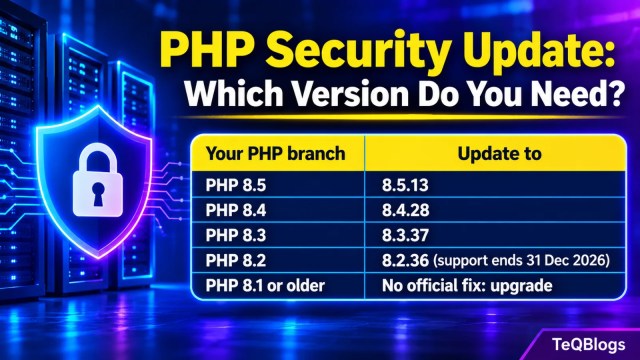
PHP released security updates on 19 November 2026 fixing critical flaws in every supported branch. Check your version and update to 8.5.13, 8.4.28, 8.3.37 or 8.2.36.

Image: TeQBlogs
The PHP project released a PHP security update on 19 November 2026 that fixes vulnerabilities rated critical in every supported branch. The fixed versions are PHP 8.5.13, 8.4.28, 8.3.37 and 8.2.36. If your website, WordPress install or web app runs on PHP, check your version today and update, or ask your hosting provider when the patch will be applied.
Before you panic: the PHP security team says the critical issues “require either non-default configuration or uncommon setups”. That lowers the odds for a typical shared-hosting site, but it is not a reason to wait. The October PHP2Shell flaws were exploited widely within days, and two of this month’s fixes close gaps left by that earlier patch.
Quick summary
| Detail | What we know |
|---|---|
| Released | 19 November 2026 |
| Fixed versions | PHP 8.5.13, 8.4.28, 8.3.37, 8.2.36 (PHP 8.6.0, released the same day, also includes the fixes) |
| Highest severity | Critical |
| Number of critical flaws | Seven, as reported from the PHP project’s advisories |
| Worst case | Remote code execution on the server |
| Who must act | Anyone running PHP 8.2 to 8.5; PHP 8.1 and older get no official fix |
| PHP 8.2 end of life | 31 December 2026 |
What does the PHP security update fix?
The update fixes several ways an attacker could run their own code on a PHP server. Most involve how PHP handles sessions and memory. One affects PHP-FPM, the process manager that many nginx and Apache servers use to run PHP.
Also read: The Role of Access Control in Information Security
| CVE | Area | What can go wrong |
|---|---|---|
| CVE-2026-129289 | PHP-FPM and LSAPI | Request smuggling: leftover request data can be treated as a new, forged request. Rated critical, CVSS 9.2. |
| CVE-2026-115560 | Session upload progress | Session data written in one format and read in another can be turned into object injection. |
| CVE-2026-126714 | Sessions | An interrupted session write can lead to attacker-controlled data being unserialised. |
| CVE-2026-129481 and CVE-2026-129182 | Session shutdown | Memory use-after-free bugs that complete the fix for October’s CVE-2026-109619. |
| CVE-2026-129474 | PHP 8.5 and later | A use-after-free that depends on the application and request data. |
| CVE-2026-129496 | Startup error logging | Memory corruption in affected configurations. |
The CVE descriptions above, other than the PHP-FPM one, are as reported by security researchers from the PHP project’s advisories. PHP says code execution has not been demonstrated for the two session-shutdown bugs.
The PHP-FPM flaw: who is actually exposed?
This is the one server admins should read closely. According to the PHP project’s advisory, PHP did not discard unread request data before reusing a persistent PHP-FPM connection. An unauthenticated attacker could use that to make PHP-FPM run attacker-controlled PHP code with the privileges of the worker process.
It needs specific conditions, which is why many servers are not exposed:
- The web server must reuse backend connections to PHP-FPM, for example nginx with
fastcgi_keep_conn on, Apachemod_proxy_fcgiwithenablereuse=on, or similar HAProxy setups. - The application must open
php://inputwithout reading it to the end, which some frameworks do before routing or authentication. - Standard configurations that close the FastCGI connection after each request are not affected by the demonstrated attack.
In practice, a high-traffic site that someone has tuned for performance is more likely to have connection reuse switched on than a default install. If you inherited a server and do not know how it was tuned, check the nginx or Apache configuration for those two settings.
How to check your PHP version
- Command line: run
php -von the server. - WordPress: go to Tools > Site Health > Info > Server and read the PHP version line.
- cPanel: open MultiPHP Manager to see the version each domain uses.
- Any site: ask your hosting provider. On shared hosting you usually cannot update PHP yourself.
How to update PHP

- Take a backup of your files and database first.
- Find your branch (8.2, 8.3, 8.4 or 8.5) and update to the fixed release in the same branch. Staying in the same branch avoids breaking changes.
- On your own Linux server, update through your package manager and restart PHP-FPM or the web server so the new version is loaded.
- On managed or shared hosting, raise a ticket and ask for the date the 19 November PHP security release will be installed.
- Confirm the new version with
php -vor WordPress Site Health, then test your site’s login, forms and checkout.
sudo apt update
sudo apt upgrade
sudo systemctl restart php8.3-fpm
php -v
The service name above is an example for PHP 8.3 on Ubuntu or Debian, so use your own version number. One thing that confuses people: Linux distributions such as Ubuntu and Debian backport security fixes into their own package versions. Your server may show an older PHP number and still be patched. Check your distribution’s security notices for these CVE numbers instead of comparing version numbers alone.
If you cannot update today
- Turn off backend connection reuse: keep nginx
fastcgi_keep_connoff and Apacheenablereuseoff. - Do not expose PHP-FPM or LSAPI ports directly to untrusted networks.
- Treat these as temporary. The PHP project says reading
php://inputfully is not reliable as the only mitigation.
Still on PHP 8.2, 8.1 or older?
PHP 8.2 gets this fix, but it reaches end of life on 31 December 2026 and will receive no security fixes after that. PHP 8.1 and older no longer receive updates from the PHP project at all, so they stay vulnerable unless your Linux vendor backports the fix. Plan a move to PHP 8.3 or 8.4 this month. Our earlier guide shows how to update your PHP version step by step.
For Indian small businesses, the usual gap is not the patch but ownership: nobody is sure who looks after the server. If that sounds familiar, Suprams offers managed IT services that include patch management.
Related: how to upgrade your WordPress site security, the Java4Shell vulnerability and this week’s PostgreSQL security update.
Frequently asked questions
Which PHP versions fix the November 2026 flaws?
PHP 8.5.13, 8.4.28, 8.3.37 and 8.2.36, all released on 19 November 2026. PHP 8.6.0, released the same day, also includes the fixes.
Is my WordPress site at risk?
WordPress runs on PHP, so the server needs the update. The PHP team says the critical issues need non-default or uncommon setups, but you should still confirm with your host that the patch is installed.
Are these PHP flaws being exploited?
No active exploitation of the new flaws had been reported at the time of writing. The related October flaw, CVE-2026-109619, has been widely exploited.
Do I need to move to PHP 8.6?
No. Update within your current branch first. PHP 8.6 is a major release with new features, so test your site before moving to it.
The bottom line
Check your PHP version, update to 8.5.13, 8.4.28, 8.3.37 or 8.2.36, and restart PHP. If you run PHP-FPM with connection reuse, treat it as urgent. If you are on PHP 8.2 or older, use this as the push to plan your upgrade before the year ends.
Sources
- PHP.net: News archive 2026 (security release announcements)
- PHP security advisory: PHP-FPM request smuggling (CVE-2026-129289)
- PHP.net: Supported versions
About The Author


