
PostgreSQL Security Update: 52 Flaws Fixed in 18.7, Patch Now
The PostgreSQL security update of 12 November 2026 fixes 52 CVEs and 140+ bugs across versions 18.7 to 14.25. Here is what to install, how to patch and the post-update steps.

Image: TeQBlogs
The PostgreSQL security update released on 12 November 2026 (versions 18.7, 17.12, 16.16, 15.20 and 14.25) fixes 52 security vulnerabilities and more than 140 bugs. Thirty-two of the flaws carry a CVSS score of 8.8, so anyone running a self-managed PostgreSQL server should install the new minor version now and then run a few post-update checks.
It is also the final release of PostgreSQL 14, which is now end-of-life and will not get any more security fixes.
Quick summary
- Released: 12 November 2026 by the PostgreSQL Global Development Group.
- New versions: 18.7, 17.12, 16.16, 15.20 and 14.25 (plus PostgreSQL 19 RC 2).
- Security fixes: 52 CVEs, including 32 rated 8.8 (high).
- Bug fixes: over 140, including several index-corruption and backup fixes.
- End of life: PostgreSQL 14.25 is the last release for version 14.
- Exploitation: the official announcement does not say any of the flaws are being exploited.
What the PostgreSQL security update fixes
Most of the high-severity flaws allow arbitrary code execution, either inside the database server through memory-safety bugs (type confusion, use-after-free, buffer overflows) or through command and SQL injection in client tools such as pg_dump, pg_restore, reindexdb and vacuumdb. Many need a low-privileged database account, and some need a user to act, for example by restoring a crafted backup file.
Also read: AI Cyberattacks Go Autonomous: Google Finds an Agent Turning Patches Into Exploits
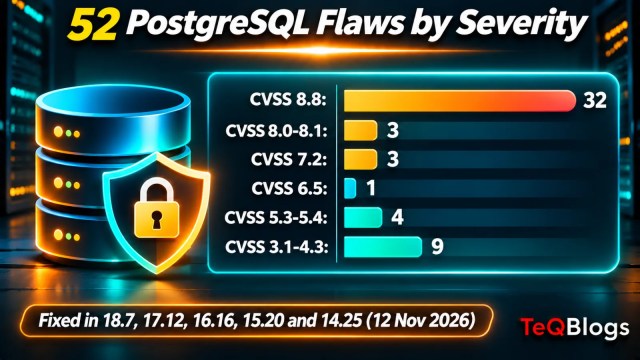
| CVSS score | Number of CVEs | Severity |
|---|---|---|
| 8.8 | 32 | High |
| 8.0 to 8.1 | 3 | High |
| 7.2 | 3 | High |
| 6.5 | 1 | Medium |
| 5.3 to 5.4 | 4 | Medium |
| 3.1 to 4.3 | 9 | Low to medium |
| Total | 52 |
Notable vulnerabilities
- CVE-2026-6460 (8.8): type confusion after
ALTER ... SET DATA TYPEcan execute arbitrary code. - CVE-2026-116314 (8.8):
pg_restorecan execute arbitrary code because non-plain archives were not validated. - CVE-2026-116330 (8.8): a
pg_dumptar archive’s restore.sql did not block psql command injection. - CVE-2026-120145 (8.8): logical replication could write to a subscriber’s system catalogs and run code.
- CVE-2026-14661 (8.1):
dblinkand subscriptions could append to arbitrary files. - CVE-2026-116325 (8.0): SQL injection through index-name quoting in
reindexdb. - CVE-2026-120154 (4.3):
INSERT ... ON CONFLICTcould read rows despite row security policies.
Exact affected versions differ per CVE and are listed on each advisory page on postgresql.org.
Which versions should you install?
Install the latest minor release of the major version you already run. A minor update does not need a dump and reload or pg_upgrade: you stop PostgreSQL, update the binaries and start it again.
| Major version | Update to | Supported until |
|---|---|---|
| PostgreSQL 18 | 18.7 | 14 November 2030 |
| PostgreSQL 17 | 17.12 | 8 November 2029 |
| PostgreSQL 16 | 16.16 | 9 November 2028 |
| PostgreSQL 15 | 15.20 | 11 November 2027 |
| PostgreSQL 14 | 14.25 (final) | End of life from 12 November 2026 |
| PostgreSQL 13 and older | No fix | Already end of life |
How to patch PostgreSQL safely
The safest order is backup first, patch second, then fix any indexes the release notes flag. Our OpenSSH patching guide for servers follows the same rhythm if you manage Linux boxes.
- Check your version with
SELECT version();in psql. - Take a fresh backup, and confirm you can restore it.
- Install the new minor release from your usual source (the PostgreSQL download page, your Linux distribution’s repository or the PGDG packages).
- Restart PostgreSQL during a maintenance window, then confirm the new version number.
- Patch standby replicas as well, so they do not stay on the vulnerable build.
- On managed cloud databases, check your provider’s console or announcements for when the new minor version is available.
Post-update steps you may need
Several of the 140-plus bug fixes deal with index and backup corruption. Updating stops new damage, but existing corruption needs a manual fix.

- GIN indexes: if you suspect corruption, run
REINDEX INDEX your_index_name;. - pg_trgm: reindex any GiST indexes that use the
gist_trgm_opsoperator class. - “missing chunk number” errors: run
REINDEX TABLE your_table_name;, which also rebuilds the TOAST index. - bpchar columns: reindex B-tree indexes on columns declared as
bpcharwithout a length (char(n)is not affected). - Incremental backups: take a new full backup and base future incremental backups on it.
- Partitioned tables: look for
NOT NULL NO INHERITconstraints, which are now disallowed on partitioned tables, and repair or drop them.
If you skipped earlier minor releases, also read the post-update steps in those release notes. Small teams without a database administrator may want help with backup and disaster recovery planning before touching production.
PostgreSQL 14 is now end of life
PostgreSQL 14 first came out on 30 September 2021, and the project supports each major version for five years. Version 14.25 is its last release, so any flaw found from now on will stay unfixed on 14. Plan a major-version upgrade to 15 or later, ideally 18, which is supported until November 2030. PostgreSQL 19 is planned for general availability on 19 November 2026, if no further release candidate is needed.
The same rule applies to the rest of your stack: unsupported software is the easiest way in, as we saw with old PHP versions and PHP2Shell and with unpatched Synology NAS boxes.
Frequently asked questions
Is the PostgreSQL 18.7 update a security release?
Yes. The 12 November 2026 release for all supported versions fixes 52 security vulnerabilities as well as more than 140 bugs.
Are these PostgreSQL flaws being exploited?
The official announcement does not say that any of them are being exploited. That can change, so patching early is still the safe choice.
Do I need pg_upgrade for a minor update?
No. Minor releases are cumulative, so you only stop the server, replace the binaries and restart. You need pg_upgrade or dump and restore only to move between major versions, such as 14 to 18.
What happens if I stay on PostgreSQL 14?
Your database keeps working, but it will receive no more security or bug fixes after 14.25. Install 14.25 now and schedule an upgrade to a supported major version.
Bottom line
With 52 CVEs fixed in one release, this update deserves a place in this week’s maintenance window. Back up, install 18.7, 17.12, 16.16, 15.20 or 14.25, reindex where the release notes say so, and start planning your move off PostgreSQL 14.
Sources
- PostgreSQL: 18.7, 17.12, 16.16, 15.20, 14.25 and 19 RC 2 released
- PostgreSQL: Versioning policy
- PostgreSQL: CVE-2026-6460 advisory
About The Author


